Friday, July 3, 2015

STS Blog Saying Goodbye, But Please Check out the Sharing the Shelves Facebook Fan Page

This little blog hasn't been doing much in the last year.  However the Sharing the Shelves Facebook fan page seems to get a lot of use.  So here's the plan.  I am going to discontinue blog posts here,  but the Sharing the Shelves Facebook fan page will stay active, for now. We'll see how that goes.

I want to say thank you to all the past contributors to this blog and the readers.  I hope that you found something helpful on Sharing the Shelves.

Please be sure to "Like" the  Sharing the Shelves Facebook fan page to see posts from other teacher librarians and tech specialist that you might interesting and helpful. Feel free to post comments or messages to the page as well.

And thanks...for  Sharing the Shelves.


Tuesday, April 1, 2014

Calling all Teacher Librarians and Media Specialists!


Sharing the Shelves is a place to share library/media center ideas with other teacher librarians and media specialists. I'd love to add you to the list of authors!  If you are interested in blogging for Sharing the Shelves, just shoot me an email.  jnase1@gmail.com


Tuesday, February 11, 2014

Have fun reading with STORYBOTS!

In December I came across a resource on Facebook that I am happy to share. It is called Storybots and it allows you to take a photo of your child or student and put them in the ebook that is created on the app or website. My oldest daughter has a print book like this her grandpa made for her where she visits Sesame Street and we still read it seven years after he gave it to her, so I knew my girls would love it.

I downloaded the app on my iPad and found out you get one free book, but then you have to pay $4.99 a month to get access to the other books and resources. Before I jumped in, I wanted to make sure my girls would use it. It was a hit - even my 2 year old laughed and giggled as her face moved across the screen in the characters body.

So I emailed to see about getting a subscription and what it all entailed and if it might also work on the Kindle we purchased for the holidays. I was very happy with the response. They do not currently have an android app, but they are working on one. They do have some of the apps available on the website - including Starring You Videos, ABC and Learning Videos, and Activity Sheets and I just got an email that Starring You Stories will be making a website appearance soon. They were also VERY kind to let me know that since I was an educator I could get a FREE subscription to all of their apps. This includes all the apps listed here which are the ones I listed on the web, plus these for apple products - Math Racer Starring You, Tap & Sing Interactive Music, Beep & Bop, Kids Radio, Kid Quoter, Coin Flip, Share Timer, and some holiday themed videos starring your class or family. All you have to do is fill out this form and they will send you an access code. And they were very quick and friendly to check in with me to see that the code worked for me.

I have not had time to try all of the apps, but my Kindergarten students absolutely love starting our time together with the ABC videos on the website and my 1st and 2nd graders have had fun seeing themselves star in the stories we have had time to read together.

This is a fun and exciting way to fill your digital shelf with some free books! Please take some time to check it out!


Thursday, October 24, 2013

How can we help?

I always thought I did a good job advocating my library program and making sure the library was the center of what the students were doing at school. I knew there was more I could do and I was ready to do it, but sadly I was not given the chance.

When it came down to a hard budget cut in my state, the position was reduced to have one person cover both the elementary and middle school library in our school. In an impromptu survey of school websites in the area it appears that is the case in many schools in my area, with some only having one teacher-librarian to cover all buildings and some cases even multiple districts. In my state school districts are only required to employ one teacher-librarian, which is a step up from when teacher-librarians were written out of the requirements in the late 90's.

As part of a class I am taking to finish up my reading endorsement, I have spent some time revisiting the 21 state studies that show the positive link between having a quality library program with a full time librarian and reading test scores. More information can be found on the Library Research Service page and my blog if you want specifics, but all 21 states that did the studies showed the positive effects that happen.

Looking at this information again made me even more excited about being a teacher-librarian again. So I got to work creating a Prezi (click on the word Prezi to see it) to share this importance with my former administration and anyone who would listen.

I was kindly thanked for my information, but informed the school was facing declining enrollment and tough budget decisions again, so now was not the time to be looking at adding positions back.

I am very grateful my information was looked at and the importance is known, but I want more. I want to help, so my question is now what? If the funding is not there, what can be done? How can we make sure our students get the most quality library program without money available? Any thoughts and suggestions would be greatly appreciated.


The librarian in search for some shelves,

Melissa K

Wednesday, October 23, 2013

New Design!


Sharing the Shelves is getting a new blog design! The change will take place over the next several weeks as I shop around for and play around with new blog designs. Previous blog posts and pages will remain intact.  Only the look is changing.   So stay tuned to see what the final design will be...

...and thanks for Sharing the Shelves!


Saturday, July 13, 2013

Sharing the Shelves is Looking for Librarian/Media Specialist Bloggers!


Sharing the Shelves is a place to share library/media center ideas with other teacher librarians and media specialists. I'd love to add you to the list of authors!  If you are interested in blogging for Sharing the Shelves, just shoot me an email.  jnase1@gmail.com

Thursday, July 11, 2013

Free Internet Safety Curriuculum

Part of my job as the Instructional Technology teacher at my previous school was to teach about Internet Safety, even to Kindergarten. It's never too early to start learning how to be safe on the Internet.


When I first started out, I had no curriculum to go by, but after searching the for resources, I soon found CyberSmart! It was a comprehensive FREE Internet safety curriculum that included parent letters, handouts, lessons and lots of links. They even offer online workshops for teachers. My county paid for one teacher per school to take the training. I was chosen for my school. I found it very informative and even fun.


I also learned about Common Sense Media about the same time and soon began to use it to look up information about websites, movies, video games, and books for my students and kids.  It gave reviews from CSM editors as well as it's users and I have continued to find it a valuable tool.  I often direct parents to this site when they are wondering about whether or not a book or a movie is appropriate for their child. It is a wonderful, free website that all parents and teachers should utilize.

CyberSmart has since merged with Common Sense Media, but the free curriculum has not suffered with the merge. There are still FREE parent letters, handouts, lessons and links to enhance lessons.  But now there are also videos to go along with each lesson.

If you have not checked out Common Sense Media's free curriculum, I highly recommend it.


Monday, April 15, 2013

Fun Poetry Sites

April is National Poetry Month so what better time to share poetry with your kiddos than now?  Have you ever thought about using the Internet to promote/teach poetry?  There are a ton of poetry sites out there that you can share with your students...for free.

Here are a few of my favorites:


Giggle Poetry is a site full of fun poems for kids. They can even rate the poems on a "Giggle Meter" after reading them.  


Make your own poetry with these virtual poetry tiles and even send in your poems to the site to be published.


And here's one just of Haikus


Karen Barry of KB...Konnected has created this livebinder FULL of poetry links, lessons, and resources.  I highly recommend bookmarking this one.


And I LOVE this Poem in Your Pocket Day freebie from Karen Barry of KB...Konnected.  You can find it here on TpT.

What resources do you use for National Poetry Month?


Sunday, April 7, 2013

Teacher Librarians on the Web


Do you ever feel like you're alone in your profession as a public or teacher librarian?  There are many times when I wish I could just meet and talk with others who are in the same boat as I am.  Since that isn't always easy to make happen, the next best thing is meeting viturally through the Internet.  I have come across some great blogs and Pinterest boards of public and teacher librarians and made some connections through these.  And now Cari of the Centered School Library blog has started a directory just for TLs and MSs.  Just head on over to her blog by clicking here to add your blog or website link and grab your TL badge.  You might even find some new friends in your area.

You can also link up your library blog or website here on Sharing the Shelves!


Just click on the Librarians on the Web link and add the link to your library blog or website.

And thanks for Sharing the Shelves!  =)


Wednesday, March 20, 2013

Children's Choice Book Awards

It's time to let the kids vote on their favorite books, authors, and illustrators of 2013.


Go to http://www.bookweekonline.com/voting to have your students cast their votes now through May 9th.  Winners will be announce May 13th.

There are some great titles, authors and illustrators nominated this year.  For a complete list of the finalists, go to http://www.bookweekonline.com/2013Finalists

Happy Voting!


Thursday, February 28, 2013

Free Online Book/Story Sites


This is just a quick post of some free sites with access to online stories and books.  I have used many of them with my interactive white board in my Media Center, especially for books that we don't have in our collection.


What are your favorite online book/story sites?  Did I leave any out?


Wednesday, February 27, 2013

Link Ups

Are you a Teacher Librarian or School Library Media Specialist?  Do you have some amazing lesson ideas, freebies, Library Pinterest boards, Teachers Pay Teacher or Teacher Notebook stores?  Want to share them with other TLs and SLMSs?  Just link up!


Click on Librarians on the Web, Media Lesson Link Ups, Freebies, Pinterest Boards, TpT Stores, or TN stores below the blog banner to add your link to the collection.  This will make finding and sharing resources super easy and super fast.

Thanks for Sharing the Shelves!


Friday, January 25, 2013

Adopt a Book

I borrowed this idea from a fellow SLMS in my county...Adopt a Book. When I weed books, I pull some that I think students might like to take home. These books are usually those that are falling apart because they are really popular with the kids, not because they have been sitting on the shelf being eating by dust and mold. But sometimes I put weeded books that are outdated on the Adopt A Book shelf and those are snatched up, too. I'd much rather have those books being read than sitting on a shelf collecting dust, so I'm happy to have them adopted.


I used some of my Scholastic Dollars earned from the Fall Book Fair to order a small book shelf and created a little sign to advertise the books that are up for "adoption."


The first day I put out these books, all the books were gone by 8:00am. Seriously! The word spread fast!


If you'd like a copy of the sign I made, you can get it here or click on the picture above.


What do you do with your weeded books?


Tuesday, January 15, 2013

Project 365: Teacher Librarian.

A 365 Project is a photography project, you take 1 photo each day for a year on a subject of your choosing and share it with the world. (from 365 Project blog)

So many of my friends participate in some sort of 365 Project that I felt compelled to see what I was missing. It turns out... a whole lot of fun and connecting and sharing. I made it a personal goal this year to keep a photo journal of my life as a teacher librarian.

Advantages:
- Powerful, visual advocacy tool for my library media program
- Opportunity to participate in a shared experience with other educators
- Flex my creativity muscles with daily photo assignments while also improving my photo-taking abilities
- Photo journal of the year does the remembering so that I don't have to
Disadvantages:
- Time

Imagine your principal asking how your program has positively impacted the school and you being able to point him/her to a photo journal capturing a staggering array of activities and experiences, all in bite-sized easy to browse morsels. 

Compelled? Captivated? Want to dip your toe into the proverbial Project 365 pool and see if the water's ripe for a swim?

Here's a tool kit of what you need to get started:

  1. Create an account on 365 Project. It's free and will take seconds to set up. This is where you'll upload your photos
  2. Follow your own inspiration or use a photo challenge list. I'm sticking with Venspired's "See the Great in Education" project. CaptureYour365 also has a great list for those looking for more general photo assignments.
  3. Download photo editing tools to realize the potential in your images. My go-to favorites for the iPhone or iPad are XNView FX and SnapSeed and both are absolutely free. You could even use Instagram or forego photo-editing altogether. 
  4. Find a network to keep you motivated. Whether you're sharing images on Facebook, on your blog, through the 365 Project site, or otherwise, staying connected will help you stay motivated throughout the whole year.

January photo challenges from Venspired.com
January photo challenges from CaptureYour365.com
May the rest of your year be filled with images of discovery, victory, insight, and joy.

- Matthew

Monday, January 14, 2013

Alphabet Labels


I've been doing a little more organization in the nonfiction section...weeding, tidying up, etc.  Maybe I've been preoccupied with non-fiction because it's the Genre of the Month.  Whatever the case, I am feeling like it's really starting to look better.


Last week I worked on the biography section.  I've seen some alphabet dividers on Demco, or maybe it was another library supply site, but I thought I would try to save money and make my own.


I used PowerPoint to create my letters.  Then I printed them off, laminated them, cut them out and adhered them to some free paint sticks.


If they work out well, I might make some for the 500s to divide up some of the animals and maybe also for the 600s.


If you'd like a copy of them, just click here or on the picture above.

Enjoy!


Monday, January 7, 2013

NetGalley


Have you heard of this wonderful website?  It is fantastic and it's free!  NetGalley is a place where teacher librarians and others in similar professions can search for and request advance digital copies of books to read and review for free.  It's a great way to preview books before you buy and to get an idea of what new books are out there.  I just joined over the weekend and already have 12 books waiting for me.  You can download the books to your Kindle, iPad or Android device as well as to you computer. They seem to be delivered as documents rather than books, but I am not picky.  I'm finding it to be a great resource!

Try it out and let me know what you think.


Thursday, January 3, 2013

Pinterest Inspired Library Display

Recently, I was inspired by a library display I saw here on Pinterest.  My students are obsessed with mustaches this year, especially the sixth graders.  Our sixth grade reading teacher has a sign in her classroom that says, "I mustache you a question but I will shave it for later."  They LOVE the word play in it!  So I purchased a package of black cardstock and downloaded the mustache shape for my Silhouette digital cutter to create a display similar to the one I saw on Pinterest.  A bonus is that the kids can use the mustache as a bookmark.  Here are the results.


Thursday, December 13, 2012

Book Swap


At the end of last school year I made a goal to do a Book Swap this school year.  I had thought I would plan for one at the end of the year, but instead I am about to hold the first Book Swap next week and I am so excited!  I thought it would be a great way to get some "new" books in the hands of students over the holiday break.


To pump up the kids about the Book Swap, I sent home reminder letters and made weekly announcements about two weeks prior to the Book Swap to give them plenty of time to gather up their books.  I also mentioned it during our weekly Media lessons.


I sent home a letter about the Book Swap based on a letter that a fellow Media Specialist made up to use at her school. You can get a copy of it and all the Book Swap files by clicking here or by clicking on the picture above.  Feel free to use it as is or as a reference for your own Book Swap letter.


Students brought books this week for the swap and I will look through them to be sure they meet the requirements.  Then I will record the number and types of books that they bring in that qualify on a spreadsheet.  You can get a copy of it as well as all the Book Swap files by clicking here or by clicking on the picture above.


I also gave each student who brought in books a receipt so that they will know how many and what types of books they will be able to swap.  You can get a copy of the receipts I used by clicking here or by clicking on the picture above.


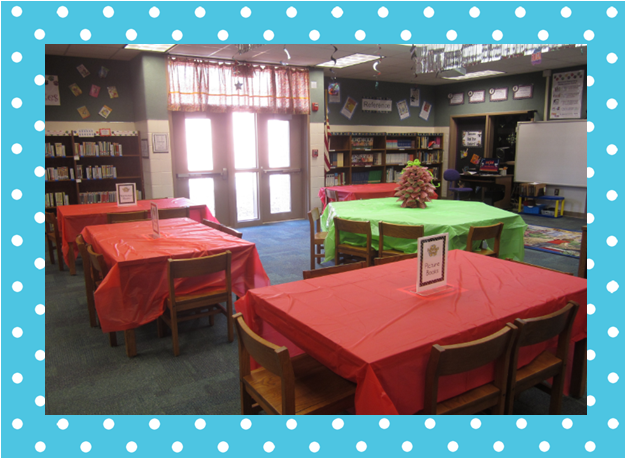
To set up, I covered all the tables in red and green table cloths and then put signs to label each table with what kind of books were at that table. This makes it easy for me to organize books when they were being turned in as well as already have the tables set up for the actual swap.


You can get a copy of the signs as well as the letter, spreadsheet and receipts by clicking here or on the picture above.


I even made a Pinterest craft for the occasion (based on this pin).  It didn't come out as well I had hoped, but it took so long to make that I wasn't going to attempt to try it again. It will do for this year anyway.

So I'm set and ready for the Book Swap.    You can stop by my blog next week to find out how it went.  If you decide to attempt a Book Swap, I'd love to hear how it goes.  If you have ever done a Book Swap in the past, how did it go?  Would you do it again?